Skip to content
Input photo
Original input before generation
Generated video
ACTUAL GENBAY CREATION8.04s · 716p
SILENT VIDEO
Santa stopped by.Made from one photo
01 / 01
YOUR PHOTO. YOUR SCENE.

Santa Caught on Camera AI.

Your room. Your tree. A little Christmas magic caught on camera. Watch Santa leave a present in an eight-second clip.

720p · 16:9 · landscape

Use this email to receive updates and access your creations.

Payment confirmation reserves 160 credits for this creation and starts generation. The other 40 credits belong to this email. No subscription; tax is shown at checkout.

Already have credits? Sign in to use them

Your photo provides the room layout, tree and furniture. GenBay prepares the opening frame and animates the visit. Target eight seconds, 720p-tier landscape MP4, with no audio. AI can change small details. A fictional festive scene, not evidence of a real visit.

Empty-room photos with permission only. By generating, you agree to our acceptable use policy.

01 Add a photo02 Generate03 Make it yours
ABOUT THE EFFECT

What is Santa Caught on Camera AI?

GenBay · Updated

Santa Caught on Camera AI turns a photo of your own living room into a short security-camera-style visit from Santa. The personal detail is your familiar room, Christmas tree and furniture, rather than a generic Christmas house.

Upload an empty-room photo. GenBay prepares the opening frame, then animates an eight-second visit with a fixed landscape camera and no audio. You do not need to write a prompt.

Video specs, credits and starting packs
Mode & outputCredits / videoStarting pack
8 seconds · 720p160$5.99 / 200 credits1 video · 40 credits left

One-time credit packs: $1.99 / 40 credits · $5.99 / 200 credits · $8.99 / 300 credits · $14.99 / 600 credits · $27.99 / 1200 credits. Credits are shared across available GenBay effects. No subscription; applicable tax is shown at checkout.

Landscape MP4; actual duration can vary from the target. Video counts apply to the mode in that row; unused credits remain. See credit packs ↗

One room. One little visit.

Your photo provides the room layout, tree and furniture. GenBay prepares the opening frame and animates the visit. Target eight seconds, 720p-tier landscape MP4, with no audio. AI can change small details. A fictional festive scene, not evidence of a real visit.

What do the actual results look like?

Compare the input, output and recorded observations from these existing examples. Individual runs show the style and limitations; they do not establish a success rate or delivery time.
Actual video generated by GenBayAn actual GenBay video from one empty-room photo. Santa leaves a gift beside the sofa and walks away.
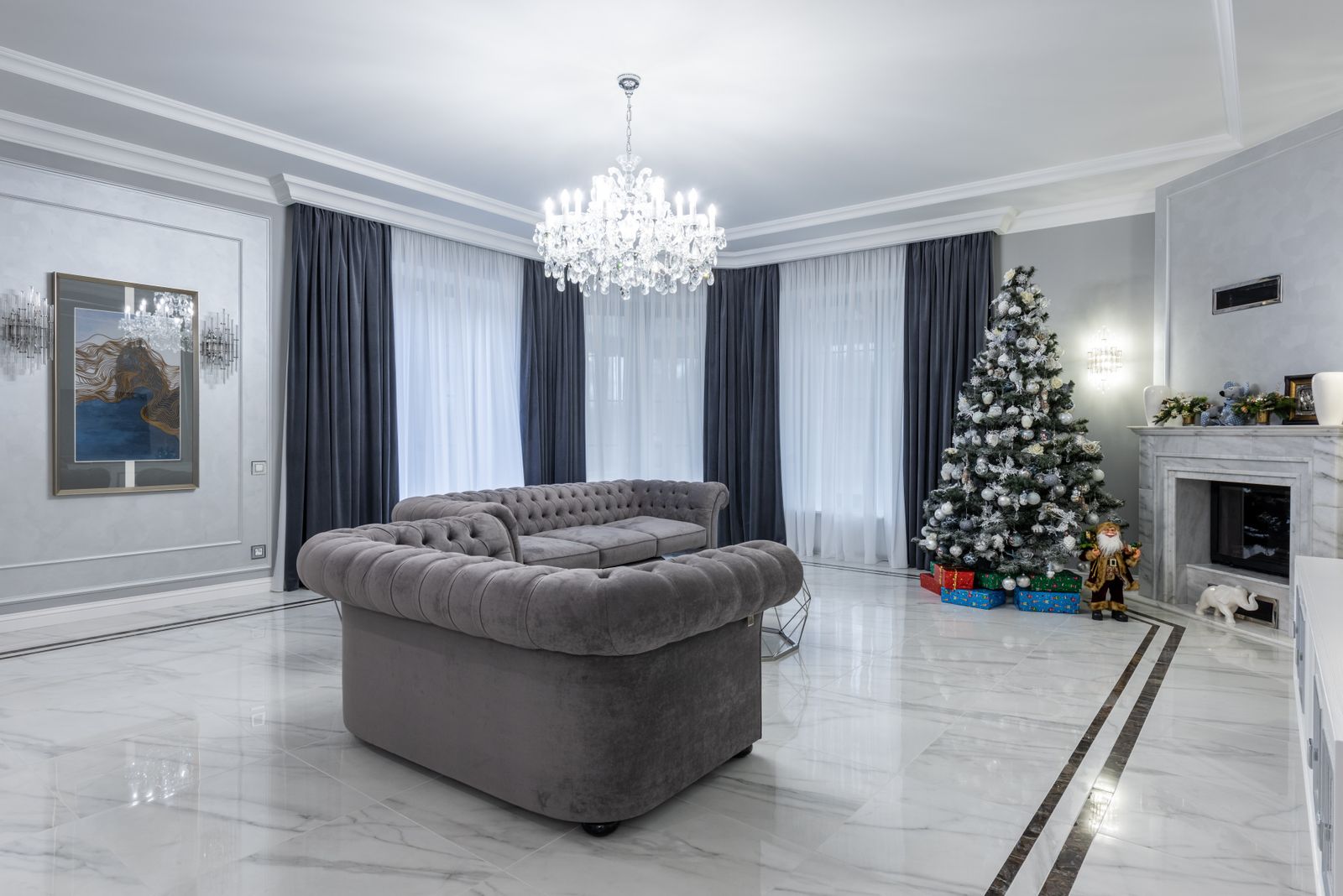
One empty living-room photo with a Christmas tree, sofa and fireplace.View input photo ↗One empty living-room photo with a Christmas tree, sofa and fireplace.
Actual length
8.0 s
Frame
1284 × 716
Recorded

The camera stays fixed as Santa enters from the left, places a gift beside the sofa and leaves. The gift remains on the floor; the clip is silent.

The prepared view is wider and higher than the input; furniture shape and details change. The gift lands by the sofa rather than the tree. Actual output is 1284×716 and about 8.04 seconds; layout and motion can vary.

How to catch Santa on your camera

  1. Photograph an empty living room with a Christmas tree and an open path across the floor.
  2. Upload the photo and confirm you may use it. One eight-second 720p video costs 160 credits.
  3. Compare the finished clip with your room photo, then download the silent landscape MP4.