Skip to content
Template Preview
YOUR PHOTO. YOUR SCENE.

Pet Bartender AI.

One pet. Three drinks. An increasingly ridiculous shift behind the bar. Make the $1, $5 and $50 drink skit with your own cat or dog.

720p · 9:16 · portrait

Use this email to receive updates and access your creations.

This pack covers this creation exactly. Once payment is confirmed, 300 credits start your generation. No subscription; tax is shown at checkout.

Already have credits? Sign in to use them

Your photo replaces the single pet bartender. The kitchen, glasses, white bib and two hidden-helper hands come from the template; those human hands are an intentional part of the joke. Drink-price captions are scene props, not the price of this generator.

Pet photos only. By generating, you agree to our acceptable use policy.

01 Add a photo02 Generate03 Make it yours
A GOOD PHOTO GOES A LONG WAY

Which photos work best for Pet Bartender AI?

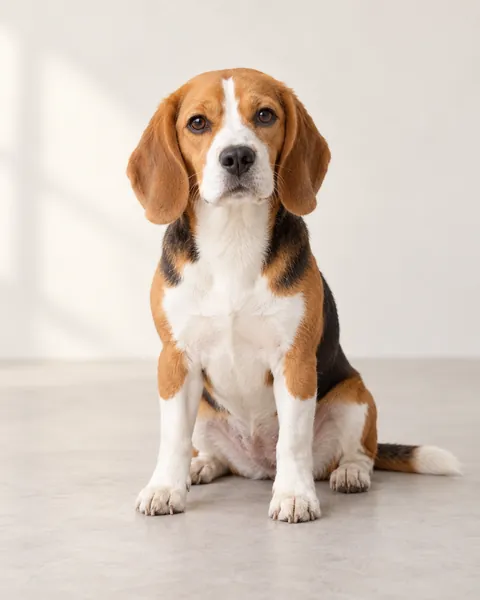
One cat or dog. Clear face, eyes, ears and chest; no people or other pets in the photo.

A clear pet photo for the input guide
THE STARTING PHOTO

Photo requirements

  • One cat or dog per photo
  • A clear face, eyes and ears
  • Show the chest in natural light
  • Permission to use the photo; no people

Avoid pet groups, covered faces, cropped paws and heavy filters.

Video length and credit cost

15 seconds300 credits

Plain cola, an ice-filled upgrade, then carved ice, a shaker, broccoli, sparkling garnish and an oversized bottle.

720p · 9:16 · MP4

Includes the template soundtrack. GenBay does not grant a music licence for that recording; check the rights required for your platform and intended use before posting.

View credit packs ↗

Follow your video in My creations

Once accepted, your task keeps running. Follow it in My creations; with work updates enabled, we email you when it is ready.

✳

What changes in your video?

Your photo replaces the single pet bartender. The kitchen, glasses, white bib and two hidden-helper hands come from the template; those human hands are an intentional part of the joke. Drink-price captions are scene props, not the price of this generator.

ABOUT THE EFFECT

What is Pet Bartender AI?

GenBay · Updated

Pet Bartender AI personalizes the three-drink skit: one extremely serious pet sits behind a kitchen counter while a hidden helper prepares increasingly over-the-top drinks. Small glasses, a white bib and the contrast between the pet’s calm expression and busy hands make the scene recognizable.

The fifteen-second template keeps all three rounds and the extravagant ending. Add one pet photo; the fixed reference supplies the hands, kitchen, cuts and prop sequence. This is a playful AI remix, not footage of your pet handling drinks.

Video specs, credits and starting packs
Mode & outputCredits / videoStarting pack
15 seconds · 720p300$8.99 / 300 credits1 video

One-time credit packs: $1.99 / 40 credits · $5.99 / 200 credits · $8.99 / 300 credits · $14.99 / 600 credits · $27.99 / 1200 credits. Credits are shared across available GenBay effects. No subscription; applicable tax is shown at checkout.

Portrait MP4; actual duration can vary from the target. Video counts apply to the mode in that row; unused credits remain. See credit packs ↗

One pet, three rounds, the complete punchline

Your photo replaces the single pet bartender. The kitchen, glasses, white bib and two hidden-helper hands come from the template; those human hands are an intentional part of the joke. Drink-price captions are scene props, not the price of this generator. The finished clip uses the matching template soundtrack. Audio rights depend on your intended use and publishing platform. 720p portrait MP4. AI can alter markings, paws, expressions or prop contact; inspect the full result before sharing.

How to make your pet video

  1. One cat or dog. Clear face, eyes, ears and chest; no people or other pets in the photo.
  2. Add your pet photo and confirm permission to use it.
  3. Review 15s / 720p / 300 credits. Pay with your email, or sign in to use existing credits.
  4. Once accepted, follow progress in My creations; ready emails follow your notification settings.
  5. Play the complete video, check identities and the ending, then download or share.