How to Make an AI Figurine Image from a Photo
Turn a person, cat or dog photo into an AI figurine image. Compare actual examples, choose 1K or 2K, and download a digital image—not a physical toy or 3D model.
To make an AI figurine image from a photo, upload a picture of one person, cat or dog to the AI Figurine Generator, choose the subject type, image quality and shape, then generate. GenBay creates a resin-figurine-style digital picture. It does not manufacture a physical toy or produce a rotatable, printable 3D model.
What does a photo-to-figurine result look like?
These are existing GenBay outputs, paired with the photos used to make them. Switch between Dog, Cat and Person to compare the figure, pose and details. The source attribution belongs to each photo; the examples are not endorsements by the people pictured.
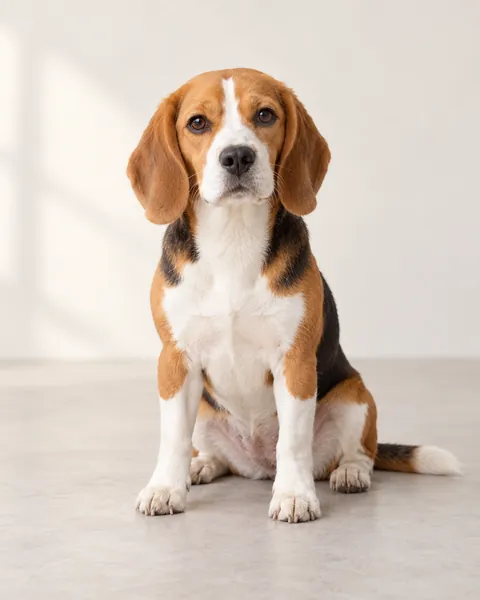
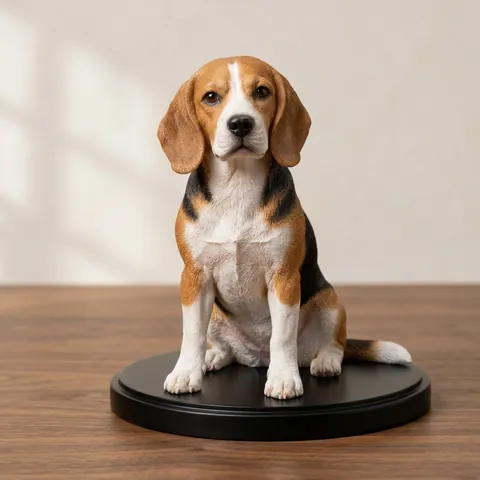
Example photo: GenBay original · Results vary with each photo.
The dog and cat examples use the 1K square option; the person example uses 2K portrait. They show the style, not a controlled quality comparison or a guarantee of likeness for a different photo.
1. Choose a photo that shows the subject clearly
Use one well-lit subject with a sharp face and visible body or outfit. A full-body photo is useful when you want to carry a pose and clothing into the figurine image. A tightly cropped headshot gives the model less information about the rest of the figure.
For pets, avoid a sofa, blanket or another animal covering the body. For people, use your own photo or a consenting adult’s photo and confirm the required permission. Do not use children, public figures or someone else’s image without consent. Upload a JPG, PNG or WebP up to 4 MB.
2. Select Person or Pet, then choose the output
Choose Person for an adult portrait and Pet for a cat or dog. Then pick a resolution and aspect ratio:
| Setting | Current options | How to choose |
|---|---|---|
| Image quality | 1K: 5 credits; 2K: 10 credits | Choose the size you need; a larger preset does not guarantee better likeness. |
| Shape | 1:1 square or 3:4 portrait | Square suits a compact figure composition; portrait leaves more vertical space. |
| Output | One digital image | No physical delivery, 3D mesh, STL file or printing service is included. |
The 1K and 2K labels describe output presets; the selected shape affects pixel dimensions. Review the current quote before submitting and see one-time credit packs for pack prices. No separate figurine subscription is required.
Choose your photo in the AI Figurine Generator →
3. Generate, then open the saved creation
Upload the required photos and confirm permission, then use your own email to buy a credit pack. Confirmed payment reserves the credits for this creation and starts generation automatically. Existing members can sign in to use their balance. Use the same purchase email to securely access and download your result; we guide you through verification when it is ready. Confirmed payment starts the prepared creation automatically; do not submit the same request again merely because you changed tabs. Existing members can sign in and use their credits.
Follow progress in My creations. Once ready, inspect the image before downloading. A confirmed technical failure returns the task’s credits; contact support with the creation details for a serious quality issue, following the refund policy.
4. Check the details that matter
Compare the face or muzzle, ears, hands or paws, clothing, figure base and background with the original. AI can change small features, invent text or simplify accessories. Do not rely on tiny lettering or logos being accurate.
For sharing, describe the result as an AI-generated figurine image. If you need a real collectible or a printable model, this output alone does not supply it. GenBay does not claim that the picture is a scan, manufactured product or exact replica.
Is an AI figurine the same as an AI action figure?
Searches for “AI figurine,” “photo to figurine” and “AI action figure” can refer to different styles. GenBay’s current effect is a resin-figurine-style image. It does not offer a separate boxed-action-figure preset, editable packaging text or a 3D export. Check the real examples above before choosing it.
For a different pet image style, explore the AI Pet Halloween Costume Generator. For moving pets rather than still pictures, use the AI pet video guide.